# 帝国CMS → 微信小程序 数据加载极简教程
## 一、帝国CMS端
### 1. 建栏目录数据
帝国后台建栏目(记下 classid ,如55),添加几条信息。
### 2. 创建接口文件
在网站根目录新建 api/list.php :
<?php
define('InEmpireCMS', true);
require('../e/class/connect.php');
require('../e/class/db_sql.php');
$link = db_connect();
$empire = new mysqlquery();

$classid = intval($_GET['classid']);
$site = 'https://diguo.teke.vip';

$sql = "SELECT id, title, titlepic FROM phome_ecms_news
        WHERE classid={$classid} ORDER BY newstime DESC";
$res = $empire->query($sql);

$list = array();
while ($r = $empire->fetch($res)) {
    $pic = $r['titlepic'];
    if ($pic && strpos($pic, 'http') !== 0) {
        $pic = $site . $pic;
    }
    $list[] = array(
        'id'    => (int)$r['id'],
        'title' => $r['title'],
        'pic'   => $pic
    );
}

header('Content-Type: application/json; charset=utf-8');
echo json_encode(array(
    'code' => 0,
    'data' => $list,
    'errorMsg' => ''
), JSON_UNESCAPED_UNICODE);
### 3. 测试
浏览器访问 https://你的域名.com/api/list.php?classid=55
返回:
{"code":0,"data":[{"id":1,"title":"标题","pic":"https://..."}],"errorMsg":""}## 二、小程序端
### 1. 页面 js
Page({
  data: {
    list: []
  },
  onLoad: function () {
    var that = this;
    wx.request({
      url: 'https://diguo.teke.vip/api/list.php',
      data: { classid: 34 },
      success: function (res) {
        if (res.data.code === 0) {
          that.setData({ list: res.data.data });
        }
      }
    });
  },
  goDetail: function (e) {
    var id = e.currentTarget.dataset.id;
    wx.navigateTo({
      url: '/pages/detail/detail?id=' + id
    });
  }
});
### 2. 页面 wxml
<nav>新闻列表</nav>
<view class="list">
  <view class="item" wx:for="{{list}}" wx:key="id" data-id="{{item.id}}" bindtap="goDetail">
    <image src="{{item.pic}}" mode="aspectFill"></image>
    <view class="title">{{item.title}}</view>
  </view>
</view>
样式表wxss
.detail{padding:30rpx}
.pic{width:100%;border-radius:12rpx}
.title{font-size:40rpx;font-weight:700;margin:20rpx 0}
.time{font-size:24rpx;color:#999;margin-bottom:30rpx}
.content{font-size:30rpx;line-height:1.8;color:#333}
### 3. 开发配置
开发者工具 → 详情 → 本地设置 → 勾选 "不校验合法域名"
### 4. 上线配置
微信公众平台 → 开发管理 → 服务器域名 → 添加 https://你的域名.com
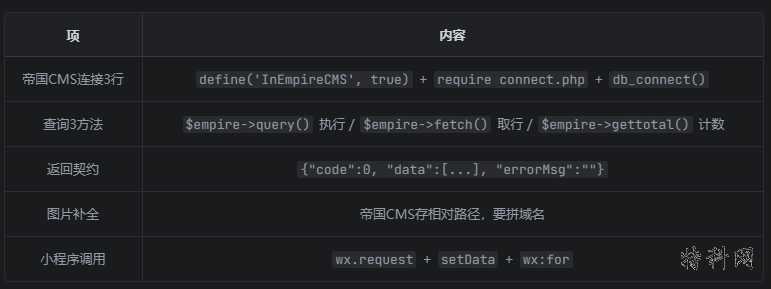
## 核心要点
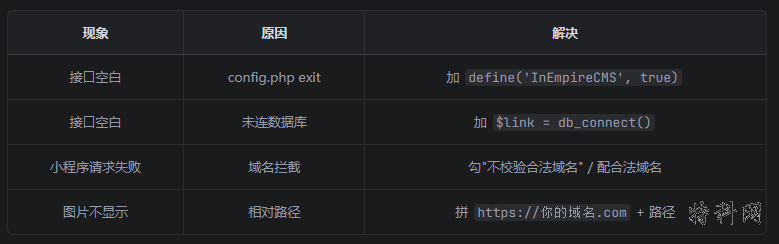
## 排错速查
这就是最小可用版本,复制改域名和 classid 即可用。