微信小程序 内容页数据加载极简教程
基于帝国CMS 7.5 + PHP 5.6 + 微信小程序原生开发
一、帝国CMS端:创建2个接口文件
在网站根目录新建 api/ 文件夹,放2个PHP文件。
1. api/list.php(列表接口)
<?php
define('InEmpireCMS', true);
require('../e/class/connect.php');
require('../e/class/db_sql.php');
$link = db_connect();
$empire = new mysqlquery();

$classid = intval($_GET['classid']);
$site = 'https://你的域名.com';

$sql = "SELECT id, title, titlepic FROM phome_ecms_news
        WHERE classid={$classid} ORDER BY newstime DESC";
$res = $empire->query($sql);

$list = array();
while ($r = $empire->fetch($res)) {
    $pic = $r['titlepic'];
    if ($pic && strpos($pic, 'http') !== 0) {
        $pic = $site . $pic;
    }
    $list[] = array(
        'id'    => (int)$r['id'],
        'title' => $r['title'],
        'pic'   => $pic
    );
}

header('Content-Type: application/json; charset=utf-8');
echo json_encode(array(
    'code' => 0,
    'data' => $list,
    'errorMsg' => ''
), JSON_UNESCAPED_UNICODE);
2. api/detail.php(详情接口)
<?php
define('InEmpireCMS', true);
require('../e/class/connect.php');
require('../e/class/db_sql.php');
$link = db_connect();
$empire = new mysqlquery();

$id = intval($_GET['id']);
$site = 'https://你的域名.com';

$sql = "SELECT id, title, titlepic, newstime, newstext
        FROM phome_ecms_news
        WHERE id={$id}";
$r = $empire->fetch1($sql);

// 标题图补全
$pic = $r['titlepic'];
if ($pic && strpos($pic, 'http') !== 0) {
    $pic = $site . $pic;
}

// 正文处理
$content = $r['newstext'];
$content = stripslashes($content);
// 图片URL补全
$content = str_replace('/d/file/', $site . '/d/file/', $content);
// 图片自适应屏幕
$content = preg_replace('/ style="[^"]*"/i', '', $content);
$content = preg_replace('/<img/i', '<img style="max-width:100%;height:auto;"', $content);

header('Content-Type: application/json; charset=utf-8');
echo json_encode(array(
    'code' => 0,
    'data' => array(
        'id'      => (int)$r['id'],
        'title'   => $r['title'],
        'pic'     => $pic,
        'time'    => date('Y-m-d', $r['newstime']),
        'content' => $content
    ),
    'errorMsg' => ''
), JSON_UNESCAPED_UNICODE);
3. 测试接口
列表 https://你的域名.com/api/list.php?classid=34
详情 https://你的域名.com/api/detail.php?id=22
返回格式:
{"code":0,"data":[{...}],"errorMsg":""}二、小程序端:列表页 + 详情页
1. 列表页 pages/list/list.js
Page({
  data: { list: [] },
  onLoad: function () {
    var that = this;
    wx.request({
      url: 'https://你的域名.com/api/list.php',
      data: { classid: 34 },
      success: function (res) {
        if (res.data.code === 0) {
          that.setData({ list: res.data.data });
        }
      }
    });
  },
  goDetail: function (e) {
    var id = e.currentTarget.dataset.id;
    wx.navigateTo({
      url: '/pages/detail/detail?id=' + id
    });
  }
});
2. 列表页 pages/list/list.wxml
<nav>内容列表</nav>
<view class="list">
  <view class="item" wx:for="{{list}}" wx:key="id" data-id="{{item.id}}" bindtap="goDetail">
    <image src="{{item.pic}}" mode="aspectFill"></image>
    <view class="title">{{item.title}}</view>
  </view>
</view>
3. 列表页 pages/list/list.wxss
.list { padding: 20rpx; }
.item {
  margin-bottom: 20rpx;
  background: #fff;
  border-radius: 12rpx;
  overflow: hidden;
}
.item image { width: 100%; height: 300rpx; }
.title { padding: 20rpx; font-size: 30rpx; color: #333; }
4. 列表页 pages/list/list.json
{
  "usingComponents": {
    "nav": "/components/nav/nav"
  }
}
5. 详情页 pages/detail/detail.js
Page({
  data: { detail: {} },
  onLoad: function (options) {
    var that = this;
    wx.request({
      url: 'https://你的域名.com/api/detail.php',
      data: { id: options.id },
      success: function (res) {
        if (res.data.code === 0) {
          that.setData({ detail: res.data.data });
        }
      }
    });
  }
});
6. 详情页 pages/detail/detail.wxml
<nav>{{detail.title}}</nav>
<view class="detail">
  <image class="pic" src="{{detail.pic}}" mode="widthFix"></image>
  <view class="title">{{detail.title}}</view>
  <view class="time">{{detail.time}}</view>
  <rich-text class="content" nodes="{{detail.content}}"></rich-text>
</view>
7. 详情页 pages/detail/detail.wxss
.detail { padding: 30rpx; }
.pic { width: 100%; border-radius: 12rpx; }
.title { font-size: 40rpx; font-weight: bold; margin: 20rpx 0; }
.time { font-size: 24rpx; color: #999; margin-bottom: 30rpx; }
.content { font-size: 30rpx; line-height: 1.8; color: #333; }
8. 详情页 pages/detail/detail.json
{
  "usingComponents": {
    "nav": "/components/nav/nav"
  }
}
9. 注册路由 app.json
{
  "pages": [
    "pages/index/index",
    "pages/list/list",
    "pages/detail/detail"
  ]
}
三、配置与测试
1. 开发阶段配置
微信开发者工具 → 详情 → 本地设置 → 勾选 "不校验合法域名..."
2. 上线配置
微信公众平台 → 开发管理 → 开发设置 → 服务器域名 → request 合法域名 → 添加 https://你的域名.com
3. 测试流程
帝国CMS后台录数据(标题+图+正文)
    ↓
浏览器测 list.php 返回 JSON
    ↓
浏览器测 detail.php 返回 JSON
    ↓
小程序编译 → 列表页显示
    ↓
点击列表项 → 跳转详情页 → 显示正文
四、核心知识点
1. 帝国CMS接口3要素
define('InEmpireCMS', true);        // ① 绕过 config.php 的 exit
require('../e/class/connect.php');  // ② 加载核心
require('../e/class/db_sql.php');
$link = db_connect();               // ③ 连接数据库
$empire = new mysqlquery();
2. 数据契约
{
  "code": 0,         // 0=成功,其他=失败
  "data": [...],     // 数据数组或对象
  "errorMsg": ""     // 错误信息
}
3. 帝国CMS数据库3方法
$empire->query($sql);      // 执行查询
$empire->fetch($res);      // 取一行(while循环用)
$empire->fetch1($sql);     // 直接取一行(单条查询用)
4. 图片URL补全
// 帝国CMS存相对路径 /d/file/...,小程序需要完整URL
$content = str_replace('/d/file/', $site . '/d/file/', $content);
5. 图片自适应
// 去掉固定宽度,加 max-width:100%
$content = preg_replace('/ style="[^"]*"/i', '', $content);
$content = preg_replace('/<img/i', '<img style="max-width:100%;height:auto;"', $content);
6. 列表→详情跳转
| 列表页 wxml | 列表页 js | 详情页接收 |
| data-id="{{item.id}}" | e.currentTarget.dataset.id | options.id |
wx.navigateTo({ url: '/pages/detail/detail?id=' + id });7. rich-text 渲染HTML
<rich-text nodes="{{detail.content}}"></rich-text>注意:rich-text 内部元素样式只能通过 HTML 的 style 属性控制,wxss 对 rich-text 内部元素不生效。
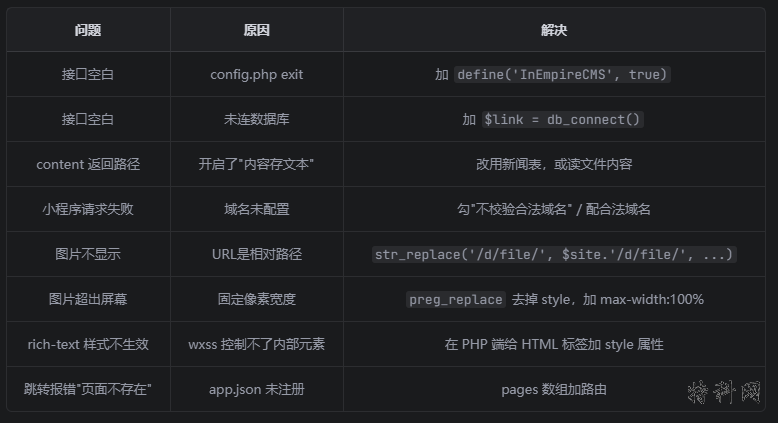
五、常见问题
六、完整数据流
帝国CMS数据库
    ↓ api/list.php 查询(WHERE classid=34)
列表接口返回 JSON
    ↓ {code:0, data:[{id,title,pic}]}
列表页 onLoad → wx.request
    ↓ setData({list})
wxml wx:for 渲染列表
    ↓ 用户点击 data-id
goDetail → wx.navigateTo
    ↓ url: /pages/detail/detail?id=22
详情页 onLoad(options)
    ↓ options.id = 22
api/detail.php?id=22
    ↓ 查单条(WHERE id=22)
返回详情 JSON
    ↓ {code:0, data:{title,pic,content}}
setData({detail})
    ↓
rich-text 渲染 HTML 正文
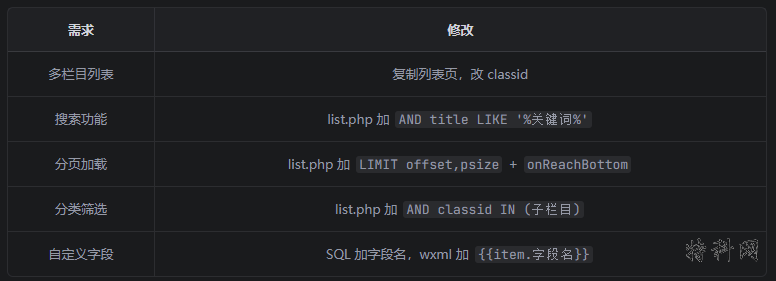
七、扩展方向
这份教程可直接复制使用,改域名和 classid 即可上线。